

Add BNB to MetaMask wallet and you instantly unlock access to one of the fastest-growing blockchain ecosystems in crypto. Whether you’re trading on a DEX, exploring GameFi projects, or simply holding BEP-20 tokens, connecting BNB Smart Chain to your wallet is the first step. This guide from BNB Guides breaks the process down into simple, beginner-friendly steps, with practical tips to help you avoid common mistakes along the way.
MetaMask is one of the most popular Web3 wallets, but it does not include BNB Smart Chain by default. If you want to explore decentralized exchanges, BEP-20 tokens, or low-fee dApps, you need to add BNB to MetaMask wallet first.
Once you add BNB to MetaMask wallet, you unlock:
BNB Smart Chain has become a go-to network for traders looking for speed and affordability. Once you connect it, you’re only a few clicks away from staking, yield farming, and NFT marketplaces built on the chain.
Before you add BNB to MetaMask wallet, make sure you have the basics ready:
You don’t need any tokens just to add the network. Tokens only matter once you start transacting.
Pro tip: Always download MetaMask from its official website only. Fake extensions are a common scam vector when people try to add BNB to MetaMask wallet, so double-check the publisher name and reviews before installing.
The fastest way to add BNB to MetaMask wallet is through the built-in network list. Here’s how:
That’s it. Your MetaMask wallet is now connected to BNB Smart Chain, and the network selector at the top should update automatically.
Pro tip: Some wallet interfaces also offer a built-in network aggregator tool. Search “BNB Smart Chain” there and click “Add to MetaMask” for a one-click setup, which reduces the chance of typing errors entirely.
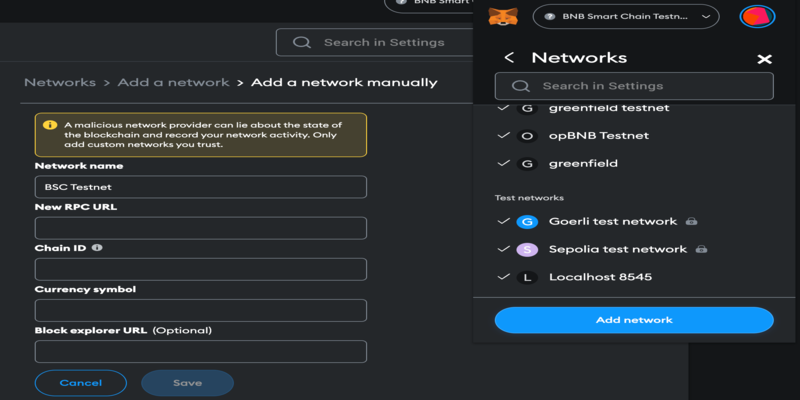
If the automatic option doesn’t appear, you can add BNB to MetaMask wallet manually by entering the network details yourself. This method works on both desktop browsers and the mobile app.
Use these official BNB Smart Chain details:
| Field | Value |
| Network Name | BNB Smart Chain |
| New RPC URL | Use the official BNB Smart Chain RPC endpoint |
| Chain ID | 56 |
| Currency Symbol | BNB |
| Block Explorer URL | Use the official BNB Smart Chain block explorer |
Pro tip: Copy and paste each field instead of typing it. A single typo in the RPC URL or Chain ID can prevent your wallet from connecting properly, or worse, connect you to the wrong network entirely.
Pro tip: Always pull the RPC URL and Chain ID from BNB Chain’s official documentation before saving. Never copy network details from random comments, ads, or unofficial sources, since scammers sometimes list altered RPC endpoints designed to reroute transactions.
Once you add BNB to MetaMask wallet, the network switches from Ethereum Mainnet to BNB Smart Chain. But your wallet balance will show zero until you fund it.
To fund your wallet:
To verify everything worked correctly:
If BNB doesn’t show up automatically, click “Import tokens” at the bottom of the token list, then add the BNB contract address manually.
Pro tip: For larger holdings, connect a hardware wallet to MetaMask instead of relying on a software-only setup. This adds an extra layer of protection to your BNB Smart Chain assets and reduces exposure to phishing attempts.
Here are the most frequent problems users run into, along with quick fixes:
Most issues come down to incorrect network data or an empty wallet. Fixing them usually takes less than a minute, and rechecking your entries against official documentation solves the vast majority of cases.
Learning how to add BNB to MetaMask wallet takes just a few minutes, whether you use the automatic method or enter the network details manually. Once connected, you can explore the entire BNB Chain ecosystem, from DeFi platforms to NFT marketplaces, all from a single wallet.
Keep your seed phrase offline, verify network details before saving, and consider a hardware wallet for larger amounts. With these steps and tips, you’re ready to use MetaMask on BNB Smart Chain safely and confidently.

 Bitcoin (BTC) $ 81,222.00 0.05%
 Ethereum (ETH) $ 2,641.32 0.28%
 Tether (USDT) $ 0.999724 0.01%
 BNB (BNB) $ 772.03 1.35%
 XRP (XRP) $ 1.41 0.02%
 USDC (USDC) $ 0.999748 0.01%
 Solana (SOL) $ 111.12 0.06%
 TRON (TRX) $ 0.342510 0.83%
 Zcash (ZEC) $ 1,513.67 2.73%
 Figure Heloc (FIGR_HELOC) $ 1.00 0%