

You must revoke BNB approvals regularly to ensure that legacy smart contracts cannot access your digital assets. While interacting with decentralized finance (DeFi) platforms, users often sign token allowances that grant protocols permission to spend their assets. However, leaving these permissions open indefinitely exposes your wallet to potential exploits. Understanding how to manage these permissions with minimal gas fees is essential for maintaining a secure and cost-efficient Web3 portfolio.
This guide explains how to secure your wallet on BNB Guides without wasting money on transaction costs.
Every on-chain action on BSC requires a small amount of gas, paid in native BNB, to cover the computational resources used by network validators. When you revoke BNB approvals, you are executing a smart contract transaction that overwrites a previously stored allowance limit, resetting it back to zero. This modification of the blockchain state requires computational work, which is why a small fee is unavoidable.
Fortunately, BSC’s gas structure remains incredibly friendly for retail users in 2026. While executing multiple operations on other chains can quickly accumulate fees, cleaning your wallet on BSC is highly economical. The average gas price on BSC consistently hovers at low levels, allowing you to secure your assets without draining your balance.
To revoke BNB approvals without wasting valuable gas, you must use highly optimized tools and avoid inefficient transaction routing. Following a systematic procedure ensures that you execute only the necessary smart contract calls, keeping your transaction fees as low as possible.

1. Access an Optimized Security Dashboard: Avoid high-fee aggregator platforms.
Navigate to a reputable, gas-optimized token approval portal such as BscScan or Revoke.cash. Connecting directly to these native security tools ensures you are interacting with clean code that minimizes gas consumption.
2. Connect Your Web3 Wallet Safely: Check for correct network selection.
Link your Web3 wallet (such as MetaMask or Trust Wallet) to the dashboard. Ensure your wallet network is explicitly set to BNB Smart Chain to avoid transaction failures or accidental cross-chain bridging attempts.
3. Identify High-Risk and Unlimited Approvals: Prioritize your revocations to save gas.
Scan the generated list of active allowances. Prioritize entries that display “Unlimited” spending limits or are linked to legacy dApps that you no longer interact with. Focus your efforts on these high-risk contracts first to optimize your gas spend.
4. Adjust Gas Settings to Safe Minimums: Do not overpay for priority block placement.
When your wallet prompts you to confirm the revocation transaction, inspect the gas settings. Because BSC is rarely congested, you can safely select the “Low” or “Standard” gas priority option instead of paying a premium for instant block inclusion.
5. Execute and Confirm the Revocation: Verify on-chain completion.
Submit the transaction and wait for block finality. Once the transaction completes, refresh the security portal to verify that the target contract’s allowance has successfully updated to zero.
Selecting the right tool directly affects how much gas you consume during your security cleanup. Different platforms utilize varying smart contract configurations to interact with your wallet. Some specialized security portals can bundle transactions or use optimized code pathways to reduce computational overhead, saving you money.
In 2026, educational platforms like BNB Guides offer extensive documentation on how different interfaces route their contract calls. Choosing an optimized platform over an outdated decentralized application interface can cut your operational costs significantly.
The table below provides a direct comparison of the typical costs and efficiency ratings for standard token allowance management methods in 2026:
| Tool / Platform | Average Gas Cost (USD) | Efficiency Rating | Primary Benefit |
| BscScan Token Approvals | $0.02 – $0.04 | Extremely High | Native explorer integration, ultra-clean code paths. |
| Revoke.cash Dashboard | $0.03 – $0.05 | High | Excellent UI, explicitly flags high-risk allowances. |
| Native Wallet Portfolios | $0.04 – $0.07 | Medium | Convenient, but sometimes uses generic, unoptimized contracts. |
| Manual Contract Interactions | $0.02 – $0.03 | Extremely High | Requires technical expertise, completely eliminates middleman code. |
Source: Average gas trackers and smart contract execution data compiled in 2026.
While knowing how to revoke BNB approvals cheaply is a powerful security tool, the most cost-effective strategy is to avoid creating unnecessary exposures in the first place. By adopting proactive security habits, you can dramatically reduce the frequency and cost of your wallet cleanups.
By managing your approvals proactively at the point of origin, you maintain absolute control over your assets while keeping your cumulative transaction fees on BSC virtually negligible.
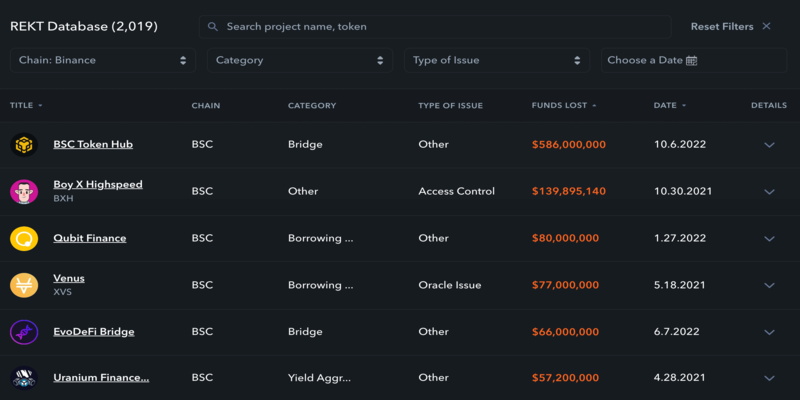
In the realm of Web3 security, learning how to revoke BNB approvals is a fundamental skill that directly shields your capital from systemic protocol exploits. Because smart contract hacks can target even the most established decentralized platforms, maintaining clean wallet permissions is your primary defense line.
Ultimately, the cost of executing these protective measures on BSC is extremely low compared to the catastrophic loss of a compromised wallet. By utilizing native tools and adjusting your gas parameters to standard levels, you can revoke BNB approvals safely, quickly, and with minimal gas consumption, ensuring your digital assets remain completely secure.


 Bitcoin (BTC) $ 86,201.00 0.31%
 Ethereum (ETH) $ 2,749.33 0.97%
 Tether (USDT) $ 0.999906 0.01%
 BNB (BNB) $ 785.47 1.98%
 XRP (XRP) $ 1.57 0.93%
 USDC (USDC) $ 0.999907 0.01%
 Solana (SOL) $ 118.26 0.83%
 TRON (TRX) $ 0.341902 0.65%
 Zcash (ZEC) $ 1,548.67 5.68%
 Figure Heloc (FIGR_HELOC) $ 1.04 2.53%