

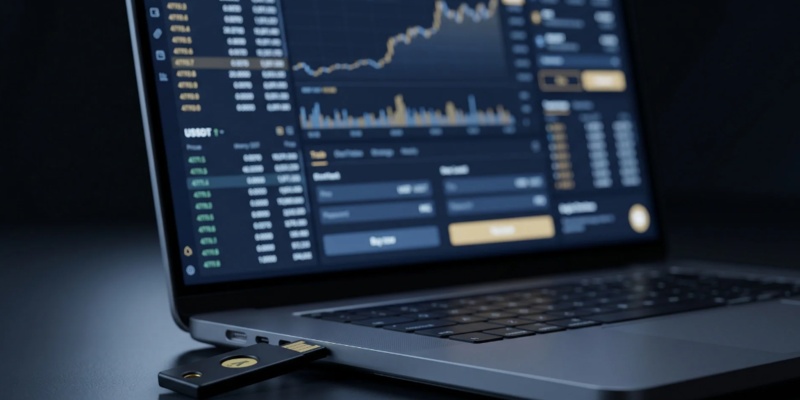
You must prioritize a secure Binance 2FA setup because basic password protection is no longer sufficient to defend your digital wealth. With cybercriminals employing highly advanced artificial intelligence to bypass legacy security systems, maintaining multi-layered account defense is a necessity for every crypto trader in 2026. This comprehensive walkthrough on BNB Guides will teach you how to lock down your exchange account, optimize your authenticator settings, and protect your assets from unauthorized access.
Implementing a robust multi-factor authentication protocol does more than just protect your login; it acts as a final barrier of defense during withdrawal requests and key security updates. Making sure you execute your Binance 2FA setup correctly is the single most effective action you can take to safeguard your funds.
A proper Binance 2FA setup forms the core of your exchange security architecture. When you configure multi-factor authentication, you require any login attempt, withdrawal, or API modification to provide two separate pieces of evidence before execution. Historically, users relied on basic email and SMS verifications. However, in 2026, those legacy channels are easily hijacked.
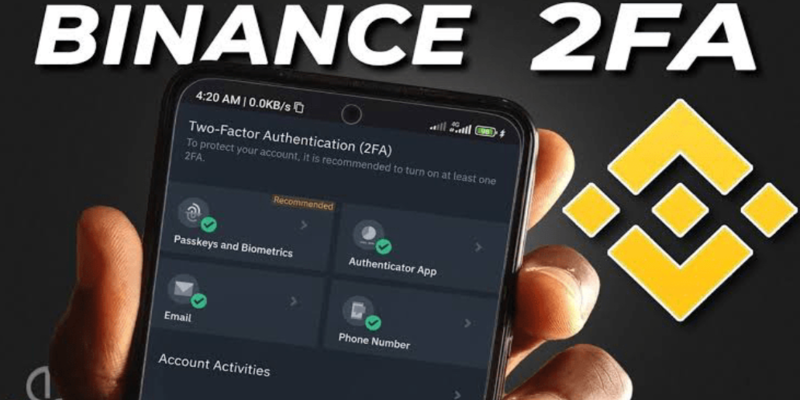
Relying on outdated verification methods leaves your wallet exposed to modern remote exploits. Understanding the vulnerabilities of different authentication factors allows you to choose the most resilient verification options available:
To combat these evolving threats, completing a modern Binance 2FA setup is the only way to ensure that a compromised password does not lead to a drained wallet.
To achieve an optimal Binance 2FA setup, you must migrate away from SMS-based verification and move toward app-based or hardware-based multi-factor authenticators. Follow this optimized procedure to upgrade your account security without risking a temporary account lock:
1. Navigate to Account Security Settings: Access the central security dashboard.
Log into your official account. Click on your profile icon in the top right corner, select “Security” from the drop-down menu, and locate the multi-factor authentication section.
2. Download a Verified Authenticator App: Prepare your offline recovery backup.
Download a reputable authenticator application such as Google Authenticator, Aegis, or OneKey on your phone. Avoid installing authenticators that lack local encryption settings.
3. Backup Your 16-Digit Recovery Key: Ensure this secret key is never saved digitally.
The setup portal will display a QR code and a 16-digit secret recovery key. Write this backup key down on a physical piece of paper and store it securely offline. If you lose your phone, this key is the only way to access your account without a lengthy verification process.
4. Scan the QR Code to Link Your Account: Link your device to the authenticator.
Open your chosen authenticator app, select the option to add a new account, and scan the QR code displayed on the screen. Alternatively, manually type in the 16-digit setup key to generate your rolling security codes.
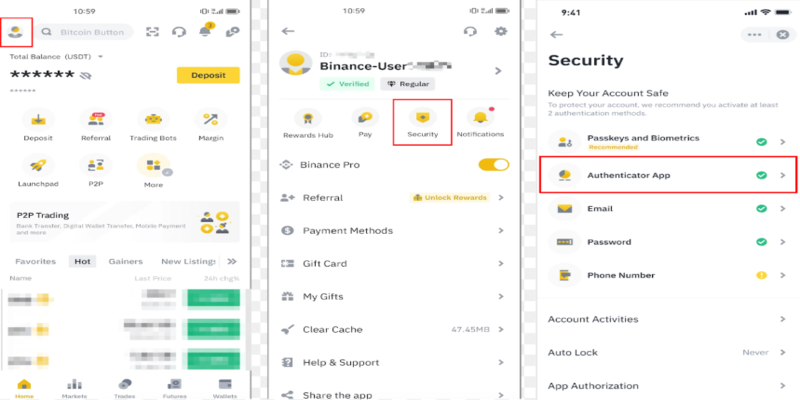
5. Disable SMS Verification Entirely: Enforce zero-trust security channels.
Once your app-based authenticator is successfully linked, navigate back to your account settings and disable SMS verification. Removing this weak link prevents hackers from attempting SIM-swap bypasses.
Your choice of authentication tools directly impacts how easily a malicious actor can compromise your funds. In 2026, security professionals categorize authentication methods into three distinct tiers of vulnerability.
The table below provides a direct, technical comparison of the security levels for different multi-factor verification options, highlighting why a comprehensive Binance 2FA setup is critical:
| Authentication Method | Security Rating | Resistance to Phishing | Risk of Remote Hijacking |
| Physical Security Keys (e.g., YubiKey) | Elite | Complete (Cryptographically bound) | Near Zero |
| App-Based Authenticators (e.g., Google) | High | Moderate (Requires active user entry) | Extremely Low (Requires physical device access) |
| Email Verification Codes | Medium | Low (Vulnerable to mailbox compromise) | High (If email account lacks robust MFA) |
| SMS Text Message Verification | Low | Very Low (Easily bypassed by attackers) | Very High (Vulnerable to telecom SIM-swaps) |
To maintain a secure profile, you should combine at least two high-tier authentication methods. For example, pairing a physical security key with a hardware-bound passkey ensures that even if one channel is compromised, an attacker still cannot access your capital.
Simply activating your security settings is not enough; you must establish clean habits to ensure you do not get locked out of your own account. Over 1-2% of help desk tickets filed by active traders relate to lost multi-factor devices, which can result in long, frustrating recovery waiting periods.
By keeping your physical recovery files safe and avoiding digital copies of your setup codes, you drastically reduce the risk of a permanent account lockout while maintaining an ironclad defense against remote hacks.
When you modify your security parameters or attempt to recover a lost account, the exchange automatically implements strict protective measures. These thresholds are designed to prevent malicious actors from instantly draining an account after obtaining compromised login credentials.
The table below illustrates the standard cooling-off periods and verification steps required when modifying security settings in 2026:
| Security Action Executed | Account Status | Withdrawal Restriction Period | Verification Required to Unlock |
| Resetting Authenticator App | Partially Locked | 24 Hours | Facial recognition plus email verification |
| Disabling SMS Verification | Fully Active | 24 Hours | Google Authenticator code plus email code |
| Changing Account Password | Restricted | 24 Hours | Comprehensive KYC document review |
| Complete Security Reset | Suspended | 48 Hours | Live video verification with government ID |
These restrictive cooling-off periods serve as an essential safety net. If an unauthorized person manages to initiate a security reset on your account, these delays give you ample time to contact support and freeze your assets before any withdrawals can be processed.
A meticulously configured security profile is the foundation of long-term success in the crypto market. While setting up these systems may feel like an administrative chore, the protection they offer far outweighs the minor inconvenience of entering a rolling verification code.
By executing a proper Binance 2FA setup, migrating away from SMS verification, and storing your backup keys securely offline, you ensure your digital assets remain safe from modern online threats. Take the time to audit your security dashboard today to keep your hard-earned investments completely protected.
 Bitcoin (BTC) $ 77,996.00 0.23%
 Ethereum (ETH) $ 2,440.82 0.64%
 Tether (USDT) $ 0.999907 0.01%
 BNB (BNB) $ 686.70 1.08%
 XRP (XRP) $ 1.37 2.28%
 USDC (USDC) $ 0.999908 0%
 Solana (SOL) $ 102.70 2.2%
 TRON (TRX) $ 0.336578 1.21%
 Figure Heloc (FIGR_HELOC) $ 1.00 0%
 Hyperliquid (HYPE) $ 81.05 2.62%