
A BNB hardware wallet is the single most critical asset-protection tool you can acquire in 2026 to secure your digital assets on the BNB Smart Chain (BSC) by shifting from vulnerable hot wallets to dedicated physical cold storage. As sophisticated on-chain exploits, smart contract drainers, and phishing techniques grow more complex this year, holding your private keys on an internet-connected device is a massive security vulnerability.
By using physical confirmation buttons for every transaction, a cold storage device prevents hackers from stealing your funds remotely. This guide on BNB Guides provides an analytical comparison of the five finest cold-storage hardware options available on the market in 2026 to help you make an informed decision.
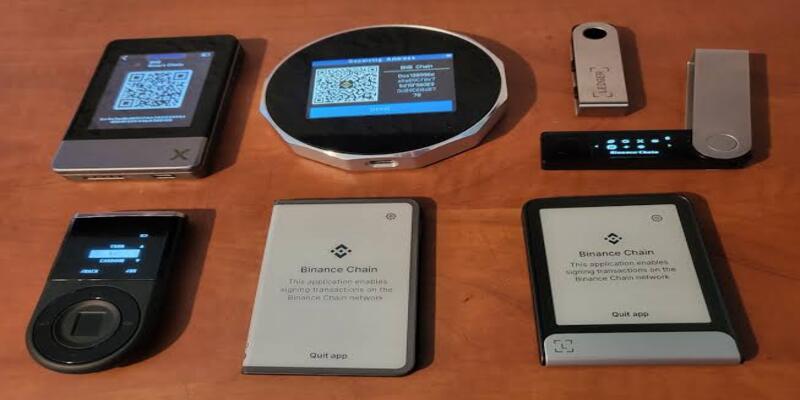
A physical BNB hardware wallet serves as a secure gateway for signing transactions offline. Unlike software-based extensions or mobile apps, a dedicated cold storage device stores your 12- or 24-word recovery seed phrase within a specialized, tamper-resistant chip known as a Secure Element. This architecture ensures that even if your primary computer or smartphone is heavily infected with remote-access trojans, your private keys cannot be extracted.
When selecting a cold-storage security device for your BNB and BEP-20 assets, you must understand the key defense layers that distinguish hardware wallets from standard hot wallets:
Choosing the best physical device depends on how you interact with dApps, smart contracts, and decentralized protocols. In 2026, the leading hardware manufacturers have optimized their systems to offer deep integration with the BNB Smart Chain ecosystem, including native BEP-20 token support and seamless connection to decentralized finance (DeFi) web extensions.
The table below provides a high-level comparison of the top five BNB hardware wallet solutions based on their core security chips and baseline connection types:
| Device Model | Primary Secure Element Rating | Connectivity Type | Transaction Simulation |
| Ledger Flex | CC EAL6+ | Bluetooth, USB-C | Supported on companion app |
| OneKey Pro | CC EAL6+ | Bluetooth, USB-C, NFC | Native on-screen simulation |
| Trezor Safe 5 | Proprietary Secure Element | USB-C | Basic warning displays |
| Keystone 3 Pro | Triple Secure Element (EAL6+) | 100% Air-Gapped (QR Code) | Full visual smart contract breakdown |
| SecuX V20 | CC EAL5+ | Bluetooth, USB-C | Basic transaction details |
The Ledger Flex serves as a highly versatile BNB hardware wallet featuring an EAL6+ secure element and a clear E-Ink touchscreen display. This screen makes it incredibly easy to review exactly what smart contract allowances you are approving on the BNB Smart Chain, significantly reducing the risk of accidental blind-signing.
Designed specifically with the Web3 power-user in mind, the OneKey Pro features seamless, native integration with its own advanced multi-chain software. Its built-in NFC and Bluetooth features allow mobile-first DeFi traders on BSC to initiate secure, physical approvals within seconds.
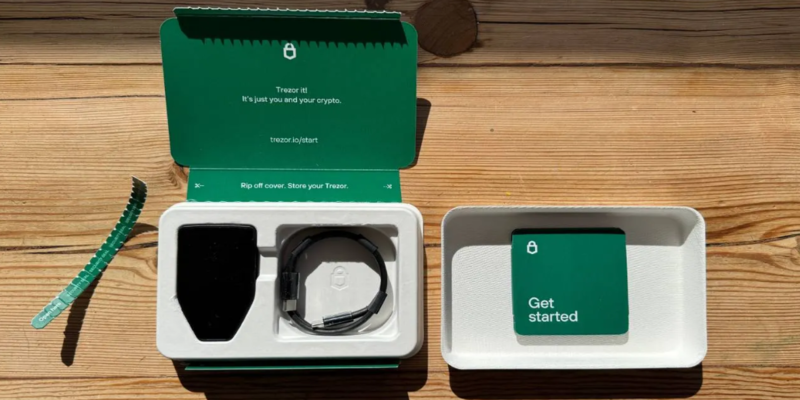
The Trezor Safe 5 is a phenomenal open-source BNB hardware wallet that utilizes a specialized secure element to protect the recovery seed phrase. Because its firmware is fully audited and public, the device remains a favorite choice for users who demand absolute transparency in their security hardware.
If your goal is complete network isolation to avoid BNB scams and remote exploits, the Keystone 3 Pro is an excellent choice. It is a 100% air-gapped device that uses physical camera scans of high-density QR codes to sign transactions, meaning it never connects to any device via USB or Bluetooth.
Equipped with a rugged, military-grade aluminum casing and a large color display, the SecuX V20 is designed for physical durability. It connects effortlessly to both iOS and Android devices via encrypted Bluetooth, making it a reliable cold storage choice for users managing BEP-20 tokens on the go.
Selecting a device is only the first step; configuring the firmware and companion apps properly is what truly secures your capital. For instance, some platforms force you to use third-party web extensions to connect to the BNB Smart Chain, while others offer direct, native software access.
The table below analyzes the active dApp integration and physical security mechanisms of these five hardware models:
| Device Model | Native BSC Network Support | Required Companion Software | Physical Screen Type |
| Ledger Flex | Yes (Via Ledger Live) | Ledger Live | 2.8-inch E-Ink Touchscreen |
| OneKey Pro | Yes (Via OneKey App) | OneKey App | 3.5-inch Color Touchscreen |
| Trezor Safe 5 | Yes (Via Trezor Suite) | Trezor Suite | 1.54-inch Color Touchscreen |
| Keystone 3 Pro | Yes (Via companion app) | Keystone App / Third-party | 4.0-inch High-Res Touchscreen |
| SecuX V20 | Yes (Via SecuX App) | SecuXess App | 2.8-inch Color Touchscreen |
Simply buying an elite hardware solution does not make you automatically safe if you do not follow strict operational guidelines. Approximately 1-2% of all major on-chain security failures occur because users store their recovery phrases in digital formats, bypassing the security of their physical devices.
A properly managed BNB hardware wallet is the absolute gold standard for preserving your digital wealth. While software options offer convenient, quick logins, they simply cannot replicate the cryptographic isolation provided by dedicated, secure microchips.

 Bitcoin (BTC) $ 78,577.00 0.6%
 Ethereum (ETH) $ 2,471.74 1.38%
 Tether (USDT) $ 0.999793 0.01%
 BNB (BNB) $ 690.33 0.65%
 XRP (XRP) $ 1.38 0.66%
 USDC (USDC) $ 0.999884 0%
 Solana (SOL) $ 103.09 0.25%
 TRON (TRX) $ 0.331720 1.47%
 Figure Heloc (FIGR_HELOC) $ 1.00 0%
 Hyperliquid (HYPE) $ 83.44 2.99%